How to read it
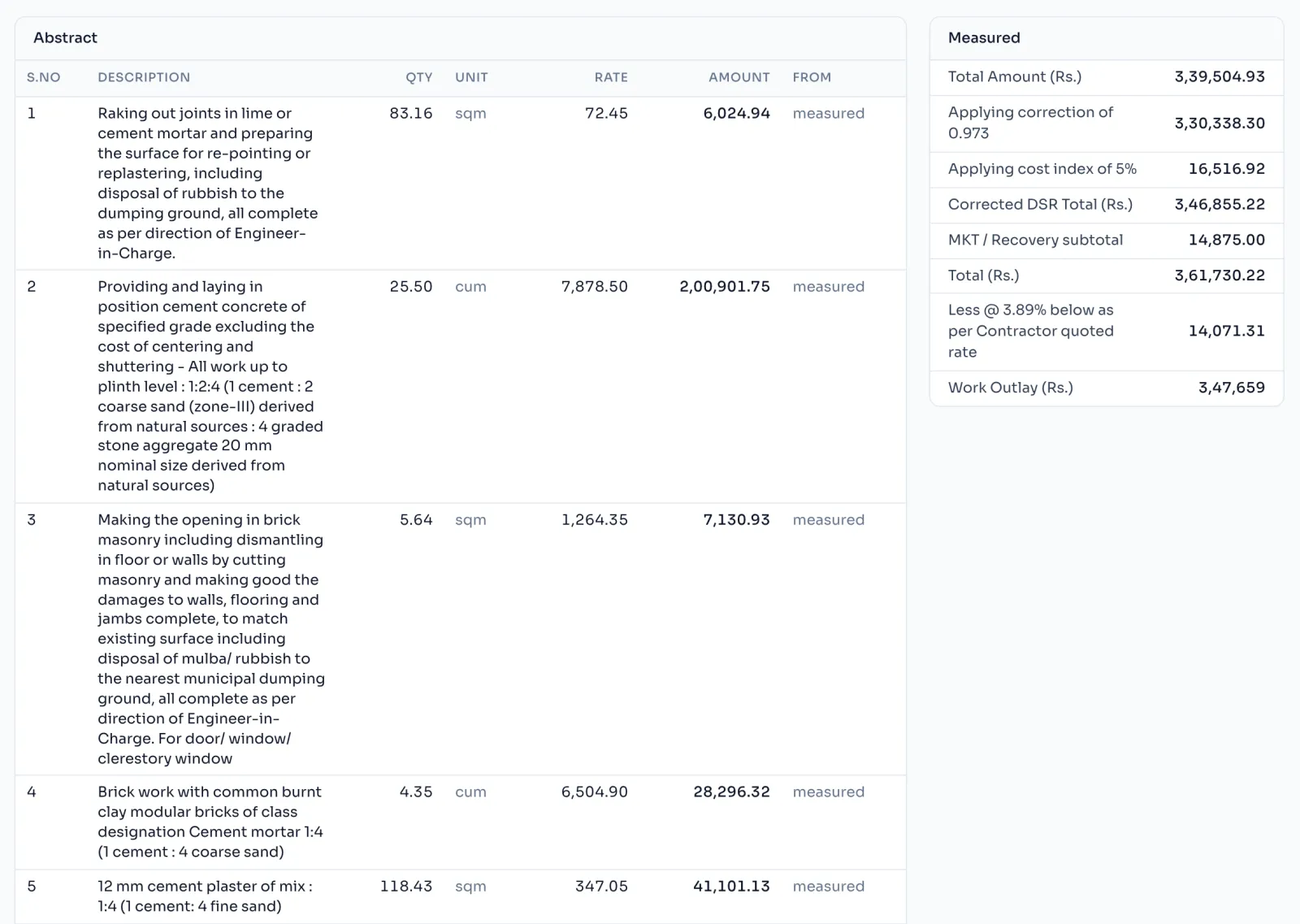
- On the bill, press Abstract in the row of tabs.
- Each item shows its S.No, description, measured quantity, unit, rate and amount.
- The From column says measured, or not measured for an item with no measurements yet.
- The panel beside it runs the measured chain down to the Work Outlay. The Abstract sheet of the bill excel prints the same figure as the Gross Amount Payable.
The certified lines
The excel's Abstract ends with these lines, under CERTIFIED, and a signature row for the EE, the AE and the JE:
- The Work has been carried out as per Specification & NIT Conditions.
- No minor labour or pregnant lady in labour has been engaged at site.
- No T & P issued to Agency
- No Electricity / Water Charges taken by the Contractor as made his own arrangement.
- A.E.'s Test Check is 100%
- E.E.'s Test Check is more than 50%
- Engaged a qualified Engineer at Site.
- All recovery have been up to date.
When the bill number has the word Final in it, two more lines are added: Completion Certificate is attached, and Measurements are full and final.
Things to know
- These lines cannot be changed in ContractBill. Read them before you send the bill, and if one is not true for your work, correct it in the excel or write to us.
- An item with no measurements is left blank, never counted as zero.
- The recoveries are worked out on the Recovery tab. Recovery and Net payable
How it is worked out
Each line of the Abstract is worked out from the measured quantity:
The measured quantity is rounded to 2 places first, the same way your department's Abstract does it, so the AE's calculator gives the same figure. For item 13.1.1 at 347.05 per sqm with 118.426 sqm measured:
| Working | Amount | |
|---|---|---|
| Item 13.1.1 | 118.43 x 347.05 | 41,101.13 |
Then the same chain as the Bill page runs on these amounts, down to the Work Outlay, which the Abstract sheet prints as the Gross Amount Payable. Factor, cost index and quoted %
If you see this message
not measured in the From column
This item has no measurements yet, so it is not priced. Write measurements