If your message is not here, write to us and send a photo of the screen. Write to us
Signing in
On the sign in and sign up screens.
That OTP is not right.
Check the 6 digits in the SMS and type them again.
That OTP has expired. Please ask for a new one.
Press Change number, or send again to get a new OTP.
Too many wrong tries. Please ask for a new OTP.
Ask for a new OTP and type it carefully.
An OTP was just sent. Please wait a moment before asking for another.
The SMS may still be on its way. Wait a little.
Too many OTPs were sent to this number. Please try again in an hour.
Wait an hour, or write to us.
The service is not available right now. Please try again in a minute.
Wait a minute and try again. If it keeps happening, write to us.
You are signed out.
Your sign in ended, or you pressed Sign out. Sign in again.
Your tender
On the tender page and every page inside a tender.
No rate book is available for this state.
That state is not loaded yet. Use Your state is not in the list? to tell us.
This tender was changed on another screen, so nothing is being saved here.
The tender is open in another tab or phone. Load the newer copy replaces what you typed here since then.
One of the three is mistyped.
The estimate, the quoted % and the tender amount do not agree. Check them against your award letter.
This code has more than one item, at different rates. Please pick the right one.
Read the descriptions and pick the one your schedule means.
The bill
On the Bill tabs.
Type the factor in the box above and your figures will show here.
The Factor box is empty or not a number. Type the factor from your agreement.
Must be above 0 and up to 2 under the Factor box
A factor is a number like 0.973.
Must be from 0 to 100 under a % box
Type the percentage as a number, like 3.89.
No measurements yet
This item has no rows. Press Add row.
not measured on the Abstract
The item has no measurements, so it is left blank. Write its rows on the Measurements tab.
Not a number, so the Schedule is used.
A sanctioned figure you typed is not a number. Correct it, or clear the box.
This is not a number on the Recovery tab
Type the rate as a number, like 2.5. Until then the department's rate is used.
No cement figures for this rate book
Your tender is on DSR 2016. Make the statement by hand with Add my figure.
Revenin AI
On the Revenin AI page of a tender.
That kind of file cannot be read. Use a PDF, or a photo in JPG, PNG or WEBP.
A photo from an iPhone is often HEIC. Send a PDF, or save the photo as JPG first.
A reading is already running on this tender.
Only one reading runs at a time. Wait for it, or stop it.
Enough reading for today
Try again tomorrow, or type the items in by hand.
free readings are used up on tenders you have not paid for yet
The notice names the tenders that hold your readings. Free readings and AI credits
Read once more and this bill will cost
One more reading moves the bill to the higher price. You are asked first.
This did not use an AI credit. Only a reading that finishes is counted.
Nothing to do. Your credit is still there.
Download
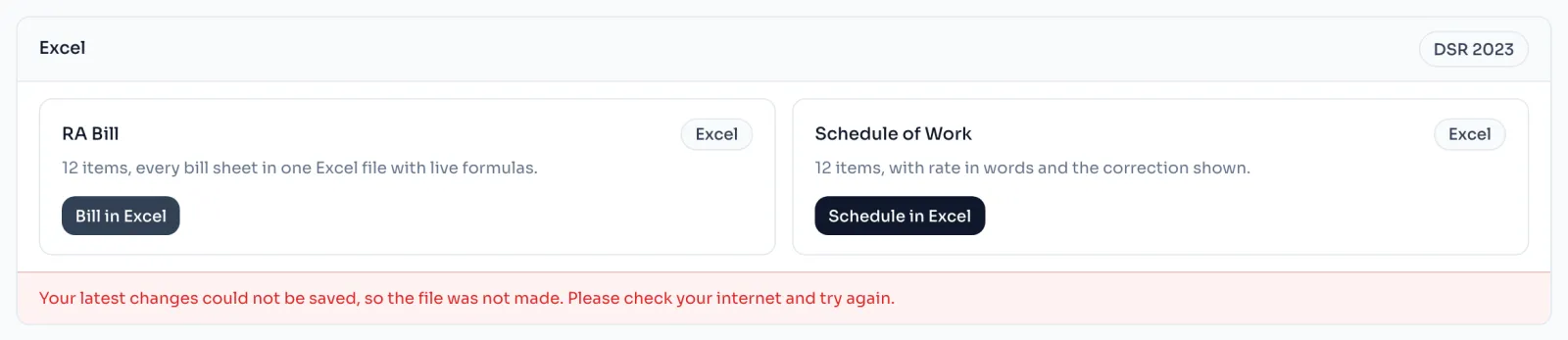
On the Download page of a tender.
Your latest changes could not be saved, so the file was not made.
Check your internet and press the button again. The file is made from your saved tender.
The bill could not be built. Please try again in a minute.
Wait a minute and try again. If it keeps happening, write to us with the tender name.
This bill has not been unlocked yet.
You have a bill in your account. Press Use one bill.
and many of the items it was paid for are not on the Schedule of Work now.
The schedule looks like a different work. Why a download was refused
and the schedule now has far more items than that work had.
The schedule has grown much bigger than the paid work. If you downloaded too early, write to us.
Any screen
This card can show on any screen.
Cannot load the rate catalog
The screen could not load. Reload the page and check your internet. If it stays, write to us.